

Kio Download on the App Store

Kio · for Apple TV

Your movies, like a streaming service.

Your own Jellyfin, Emby or Plex library on Apple TV, with the big artwork, Continue Watching and profiles of a streaming service you'd pay for. And it plays your files the way they are: 4K with Dolby Vision, and Dolby Atmos to your receiver.

Download on the App Store

Free for 14 days, then €9.99 a year or €49.99 once, for the whole family

Your own library, front and center.

Recorded in Kio. The films are 1920s silent classics in the public domain.
  1. 01

    Looks like a streaming service

    A featured row, Continue Watching, your Watchlist and a page for every movie, show and actor.

  2. 02

    Plays your files in full quality

    4K with Dolby Vision, HDR10+ and HLG. Atmos from Dolby Digital Plus; TrueHD and DTS as multichannel sound.

  3. 03

    Made for the whole family

    Up to five profiles on each Apple TV, kids profiles by age, and Jellyfin or Emby invites for family at their place.

  4. 04

    Your library stays yours

    Works with Jellyfin, Emby and Plex. No account with us, no ads, no tracking.

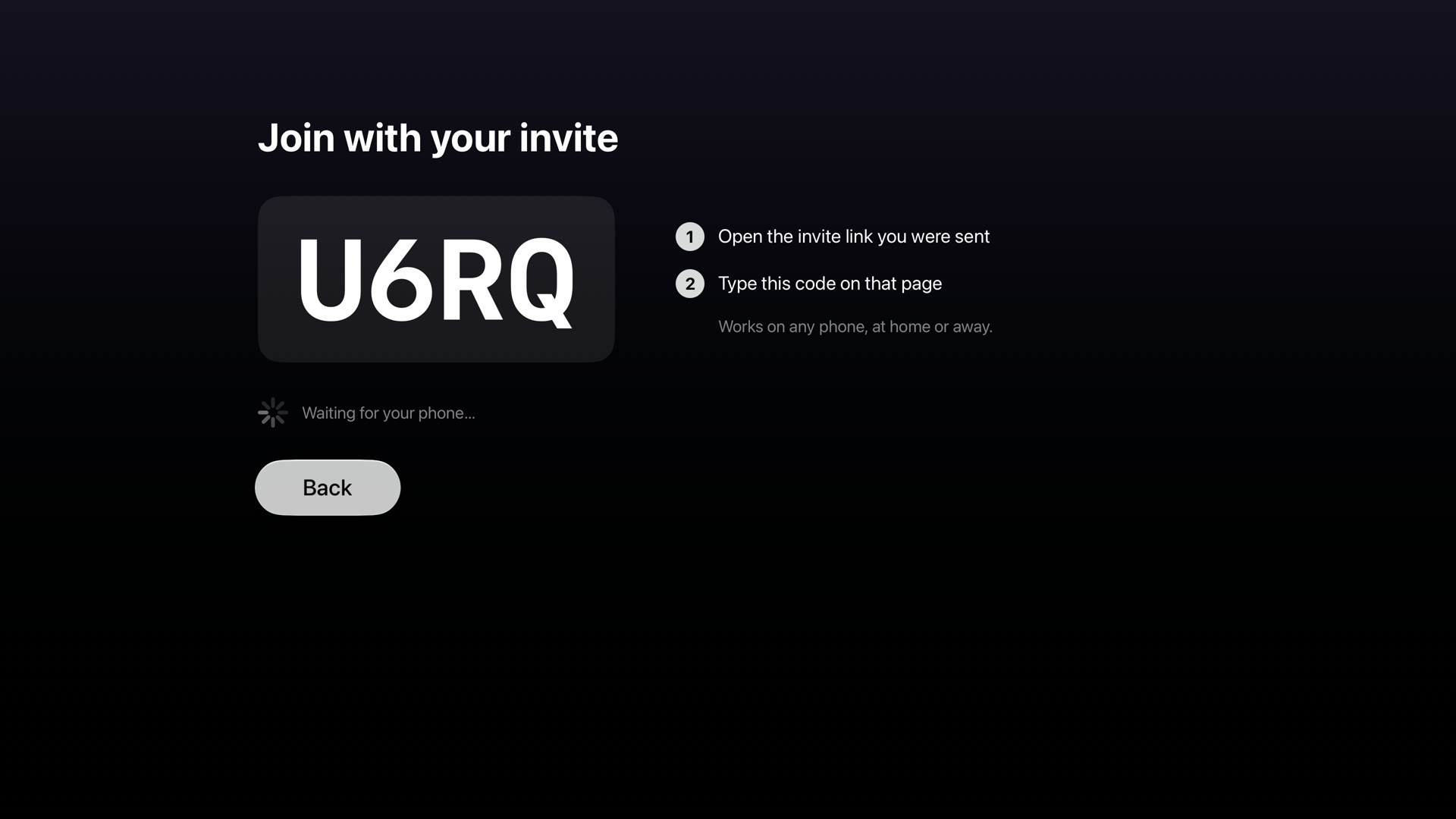
Kio's Join with your invite screen on an Apple TV, showing a four-character code and two steps.
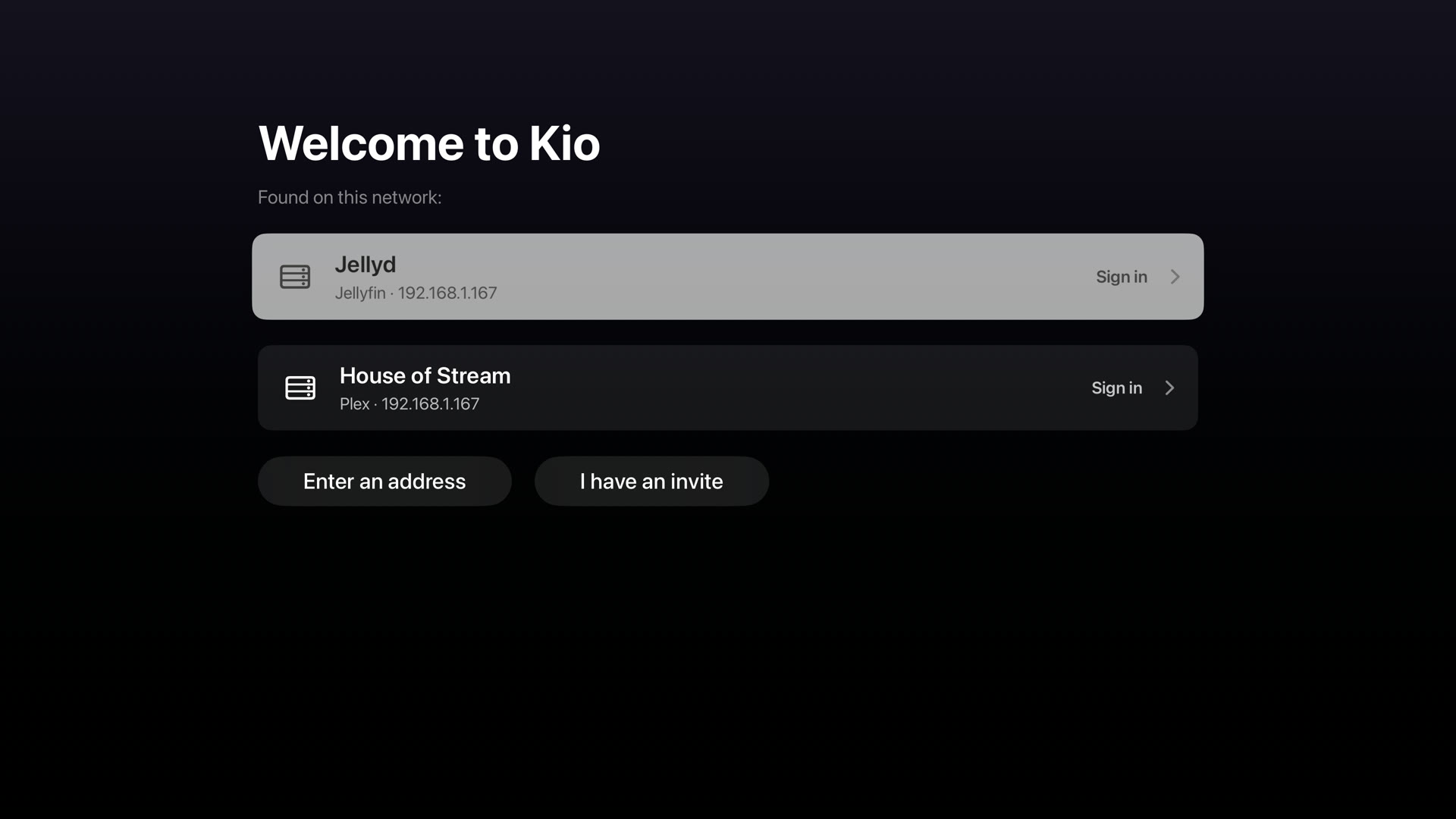
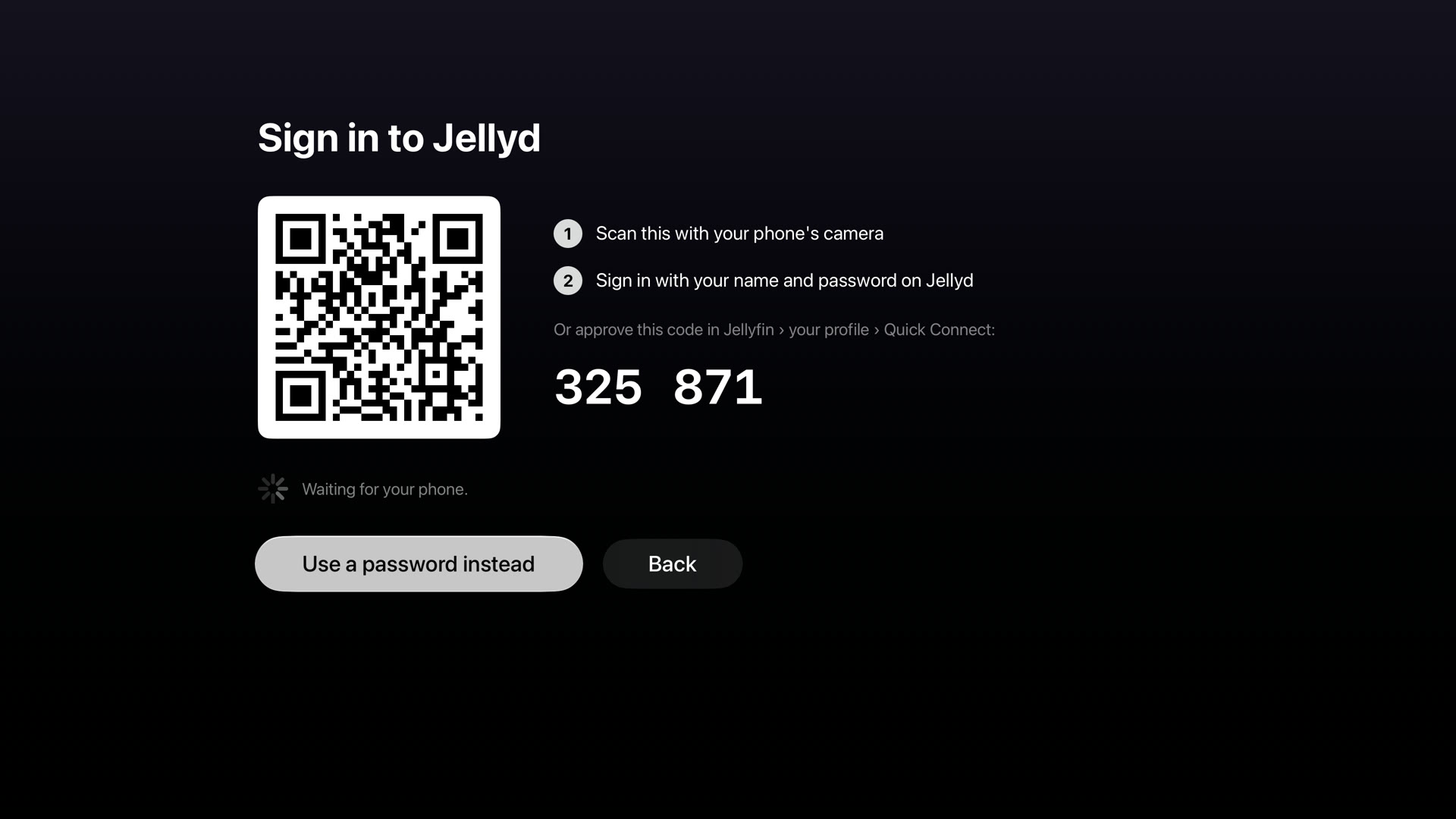
Kio's Welcome to Kio screen listing a Jellyfin and a Plex server found on the network, then Sign in with a QR code and a six-digit code.

Metropolis (1927), opened from the Movies row.

Click the remote, or keep scrolling

01A page for every title

It looks like it belongs on your TV.

Big artwork, roomy rows, Continue Watching, your Watchlist and a page for every movie, show and actor. Pick a title and its page grows out of the poster. What's trending this week and More like this come built in, with nothing to set up.

02Plays what you have

Picture and sound the way the file has them.

4K HDR
with Dolby Vision, HDR10+, HDR10 and HLG, on an Apple TV 4K
Sound
Dolby Atmos from Dolby Digital Plus tracks goes to your receiver; TrueHD and DTS, lossless ones too, play as multichannel sound
Subtitles
picture-based (PGS, VobSub) and styled (ASS) subtitles, drawn exactly as authored
Frame rate
with the Apple TV's Match Content on, your TV switches to each film's frame rate and dynamic range

03Profiles

Everyone in the house gets their own Kio.

Up to five profiles on each Apple TV, each with its own Continue Watching, Watchlist, history and languages. Kids profiles only show what's rated for the age you pick, and any profile can have a PIN.

04Family

Your library at your parents' place, in a minute.

On Jellyfin or Emby, send an invite link from Kio's Settings. On their Apple TV they choose I have an invite, type the code it shows into your link on their phone, then create their profile with their own name. Kio sets up their account on your server, and nobody types a password. On Plex, you share from Plex itself.

05Setup

Set up with your phone, not the remote.

At home, Kio finds your Jellyfin, Emby and Plex servers by itself. Sign in by scanning a code with your phone, or approve the six-digit code in Jellyfin's Quick Connect. Anything long, like a server's address, you type on your phone.

And the rest

The small things you'd miss if they weren't there.

  • Skip Intro, Recap and Credits

    One press, wherever your server has them marked.

  • Trailers and theme songs

    Trailers open in the YouTube app, and a show's theme song plays on its page when your server has one.

  • On the Top Shelf

    Continue Watching, Recently added and Trending this week, above the Home Screen while Kio is in the top row.

  • Thumbnails as you scrub

    See where you're going in the timeline, in 4K HDR and Dolby Vision files too.

  • English and Portuguese

    The whole app in both, and you can pick one in Settings.

  • Jellyfin, Emby or Plex

    Works with Jellyfin, Emby and Plex servers. No server? It also plays from shared folders at home, and a WebDAV folder can be added in Settings.

Price

Free for 14 days, then one price for the whole family.

Family Sharing covers everyone in your Apple family. Prices in euros; the App Store shows yours.

Once
€49.99once
Kio for good, no renewals
Yearly
€9.99a year
Cancel whenever you like

No account with us, no ads, no tracking. Playback reports are sent only if you say yes, and never include titles or file names. A log for fixing a problem leaves your Apple TV only when you choose Send.

Questions

Things people ask before they switch.

Does Kio come with movies?

No. Kio has no movies or shows of its own: everything it plays comes from your own Jellyfin, Emby or Plex server, like your collection, your home videos or public-domain classics like the ones on this page.

Jellyfin, Emby or Plex: does it matter?

All three work. Jellyfin and Emby get a little more: family invites live there, because Kio can set up the other person's account on your server (you need to be its admin). On Plex you share your library from Plex itself, each person needs a free Plex account, and watching from outside your home needs Plex Pass or Remote Watch Pass. That one is Plex's rule, not mine.

Which Apple TV do I need?

Any Apple TV on tvOS 18 or later, so the Apple TV HD and every Apple TV 4K. For 4K, HDR and Dolby Vision you need an Apple TV 4K, and a TV that shows them.

What does my family need to know?

Almost nothing. On their Apple TV they choose I have an invite, type the code it shows into your link on their phone, and pick their own name. The invite link works for a week. If they're in your Apple family, Family Sharing covers them, so they never see a price either.

Can I pay once?

Yes: €49.99 once and Kio is yours for good, for the whole family. Or €9.99 a year, and cancel whenever you like. Either way the first 14 days are free.

What does Kio send anywhere?

To your own server, what it needs to play and list things. To me, only what you choose to send: playback reports if you say yes, which hold technical details and never a title, a file name or anything that identifies you, and a log if you send one from Settings › General › Report a problem to fix a problem, with addresses and file names taken out. Trending and More like this come from Trakt; those requests carry the title or person being looked up, never your library or your name, unless you connect your Trakt account to keep your watch history there. Anything you type on your phone for Kio is encrypted with a key only your Apple TV has, and deleted as soon as the TV has it. The privacy policy lists every request.